> ## Documentation Index
> Fetch the complete documentation index at: https://lightdash-mintlify-40ee5f93.mintlify.site/llms.txt
> Use this file to discover all available pages before exploring further.
# Timezones
> How Lightdash handles timezones in date filters, grouping, and display, what settings are available, and how to work around common timezone issues.
## How Lightdash uses timezones
When you apply a relative date filter like "today", "last 1 completed day", or "in the current month", Lightdash needs to determine what "today" means. By default, Lightdash uses **UTC** for all relative date filter calculations.
This means that for a user in California (Pacific Time, UTC-8), "today" rolls over at **4:00 PM local time** because that's when midnight UTC occurs. This applies to all relative date filters - "yesterday", "in the current week", "last 7 completed days", etc.
**Absolute date filters** (e.g., "equals 2026-01-15" or "is between 2026-01-01 and 2026-01-31") encode exact moments, so timezone settings don't reinterpret saved filter values. The datetime picker itself, however, can render and interpret values in the project timezone instead of the browser's - see [Date filter inputs in project timezone](#date-filter-inputs-in-project-timezone).
### What happens under the hood
When a relative date filter is applied, Lightdash:
1. Gets the current time in UTC (or the configured timezone - see [Timezone settings](#timezone-settings-in-lightdash))
2. Calculates the start and end of the requested period (e.g., start of yesterday, end of yesterday)
3. Converts those boundaries to UTC timestamps
4. Generates a SQL `WHERE` clause using those boundaries
For example, "last 1 completed day" queried on Feb 13 at 3 PM UTC becomes:
```sql theme={null}
WHERE date >= '2026-02-12' AND date < '2026-02-13'
```
For the full list of date filter types and their SQL output, see the [Date/Timestamp Filter Reference Guide](/guides/filters#datetimestamp-filter-reference-guide).
## Timezone settings in Lightdash
Lightdash has two separate timezone settings that solve different problems at different layers:
| Setting | Acts on | Question it answers | Where configured |
| -------------------------- | ---------------------------------- | ---------------------------------------------------------------------------- | ---------------------------------------- |
| **Project query timezone** | How Lightdash interprets your data | "What timezone should my users see data in?" | Project settings → Timezone |
| **Data timezone** | How the warehouse reads timestamps | "What timezone are my timestamps without timezone metadata (NTZ) stored in?" | Warehouse connection → Advanced settings |
**Beta:** Several features on this page are currently in the [Beta](/references/workspace/feature-maturity-levels) phase. Contact support to enable them for your organization - each section below is marked accordingly. Without them, the project query timezone only adjusts relative date filter boundaries; everything else renders the raw warehouse value.
### How the project query timezone is resolved
Lightdash picks the active project query timezone using the hierarchy below (highest priority wins):
1. **Per-chart timezone** - set on an individual chart in the Explore view
2. **User timezone** - set by a logged-in user in their profile
3. **Project query timezone** - set by an admin in project settings
4. **`LIGHTDASH_QUERY_TIMEZONE`** environment variable - server-wide fallback
5. **UTC** - default if nothing else is configured
### Per-chart timezone picker
**Beta:** The per-chart timezone picker is currently in the [Beta](/references/workspace/feature-maturity-levels) phase. Contact support to enable it for your organization.
You can override the query timezone for an individual chart in the Explore view. When building or editing a chart, use the timezone picker to select a timezone. This only applies to that specific chart and takes the highest priority in the hierarchy.
### User timezone
**Beta:** The user timezone setting is currently in the [Beta](/references/workspace/feature-maturity-levels) phase. Contact support to enable it for your organization.
Logged-in users can set a personal default timezone in **Settings > Profile > Default timezone**. When set, this timezone applies to every query the user runs across every project they have access to, unless a chart pins its own timezone with the [per-chart timezone picker](#per-chart-timezone-picker).
The user timezone sits between the per-chart and project query timezones in the [resolution hierarchy](#how-the-project-query-timezone-is-resolved), so:
* A chart-level timezone override always wins over the user's preference.
* When no chart-level override is set, the user's preference wins over the project default.
* Leave the field empty to fall back to the project query timezone.
The user timezone affects the same behaviors as the project query timezone (relative date filter boundaries, and - with Beta support enabled - display, `DATE_TRUNC` grouping, and calendar extracts). It does **not** apply to:
* **Anonymous viewers** - embed and JWT sessions don't have a profile, so they always use the project query timezone.
Scheduled deliveries run their queries as the user who created the delivery, so the creator's user timezone applies to the query results. The delivery's own timezone setting only controls **when** the delivery runs, not how the queries interpret dates.
Organization and project admins can set a default query timezone for the project in **Settings > Project Settings**.
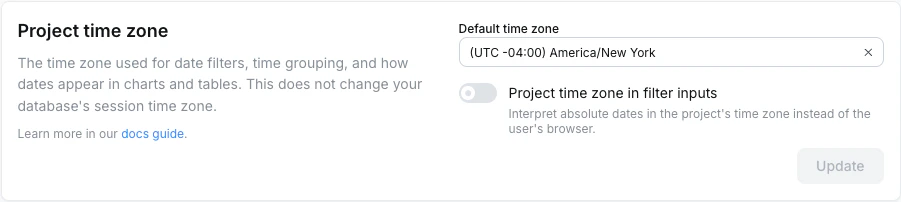
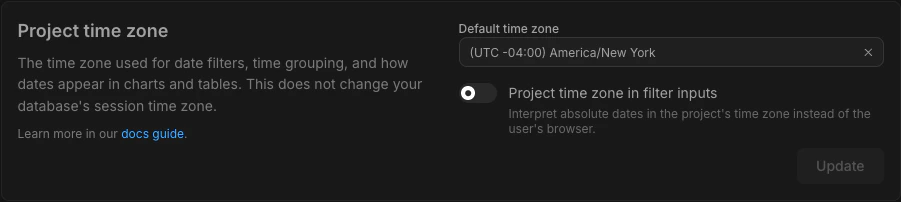 This is the recommended way to configure the query timezone for most teams. It controls relative date filter boundaries on its own, and unlocks the rest of the project query timezone behaviors below when Beta support is enabled for your organization.
**Works on every project:**
* **Relative date filter boundaries** - what "today", "yesterday", "in the current month" mean
**Requires [Beta](/references/workspace/feature-maturity-levels) support** (contact support to enable):
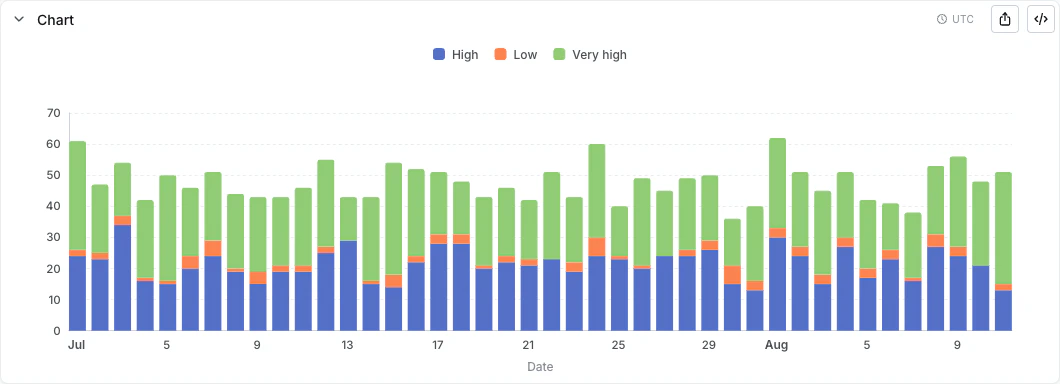
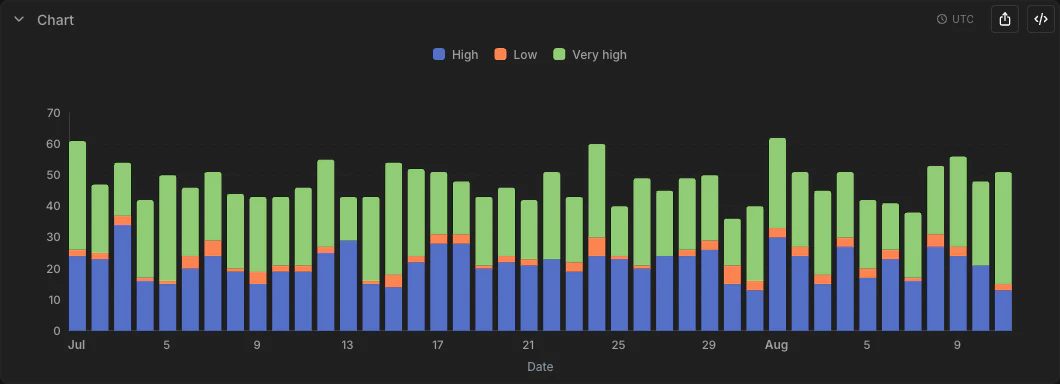
* **Display** - table cells, chart axes, tooltips, and CSV/Excel/Google Sheets exports render timestamps in the project query timezone. A badge in the Explore view (when viewing or editing a saved chart) shows which timezone from the hierarchy is currently active.
* **`DATE_TRUNC` grouping** - day, week, month, quarter, and year buckets align to the project query timezone calendar.
* **Calendar extracts** - dimensions like "day of week", "month number", and "hour of day" are computed in the project query timezone, so they line up with their `DATE_TRUNC` siblings on the same row.
* **Per-dimension opt-out** - individual dimensions can keep their raw warehouse value with `convert_timezone: false`. See [Per-dimension timezone opt-out](#per-dimension-timezone-opt-out) below.
* **Date filter inputs** - the datetime picker in absolute date filters can be set to display and interpret values in the project query timezone, so the same typed value resolves to the same moment for every user regardless of their browser timezone. See [Date filter inputs in project timezone](#date-filter-inputs-in-project-timezone) below.
Truncated intervals and extracts built on a `date`-typed dimension (e.g. `order_date_month` where `order_date` is `type: date`) ignore the timezone shift - a `date` has no time component, so it always renders as the calendar date it represents.
This is the recommended way to configure the query timezone for most teams. It controls relative date filter boundaries on its own, and unlocks the rest of the project query timezone behaviors below when Beta support is enabled for your organization.
**Works on every project:**
* **Relative date filter boundaries** - what "today", "yesterday", "in the current month" mean
**Requires [Beta](/references/workspace/feature-maturity-levels) support** (contact support to enable):
* **Display** - table cells, chart axes, tooltips, and CSV/Excel/Google Sheets exports render timestamps in the project query timezone. A badge in the Explore view (when viewing or editing a saved chart) shows which timezone from the hierarchy is currently active.
* **`DATE_TRUNC` grouping** - day, week, month, quarter, and year buckets align to the project query timezone calendar.
* **Calendar extracts** - dimensions like "day of week", "month number", and "hour of day" are computed in the project query timezone, so they line up with their `DATE_TRUNC` siblings on the same row.
* **Per-dimension opt-out** - individual dimensions can keep their raw warehouse value with `convert_timezone: false`. See [Per-dimension timezone opt-out](#per-dimension-timezone-opt-out) below.
* **Date filter inputs** - the datetime picker in absolute date filters can be set to display and interpret values in the project query timezone, so the same typed value resolves to the same moment for every user regardless of their browser timezone. See [Date filter inputs in project timezone](#date-filter-inputs-in-project-timezone) below.
Truncated intervals and extracts built on a `date`-typed dimension (e.g. `order_date_month` where `order_date` is `type: date`) ignore the timezone shift - a `date` has no time component, so it always renders as the calendar date it represents.
 #### Date filter inputs in project timezone
**Beta:** Date filter inputs in the project query timezone are currently in the [Beta](/references/workspace/feature-maturity-levels) phase. Contact support to enable, and set a project query timezone first - the toggle is disabled until one is set.
By default, the datetime picker in absolute date filters operates in the **browser's** timezone. Two users in different timezones who type the same wall-clock value (e.g., `2026-03-15 00:00`) submit different UTC instants, so a shared dashboard filter can return different rows depending on where the viewer is.
Project admins can flip this with the **Use project time zone in date filter inputs** toggle on the project timezone settings page. When enabled:
* The picker displays existing filter values in the project query timezone, and interprets newly entered values in that zone as well.
* A subtext under the picker shows the equivalent local-time value, and a side label shows the active timezone.
* Saved filter values aren't rewritten - they continue to encode the same UTC instant, just rendered in a different zone. A filter previously shown as "March 15 00:00" (EET) would now display as "March 14 22:00" if the project query timezone is UTC.
#### Date filter inputs in project timezone
**Beta:** Date filter inputs in the project query timezone are currently in the [Beta](/references/workspace/feature-maturity-levels) phase. Contact support to enable, and set a project query timezone first - the toggle is disabled until one is set.
By default, the datetime picker in absolute date filters operates in the **browser's** timezone. Two users in different timezones who type the same wall-clock value (e.g., `2026-03-15 00:00`) submit different UTC instants, so a shared dashboard filter can return different rows depending on where the viewer is.
Project admins can flip this with the **Use project time zone in date filter inputs** toggle on the project timezone settings page. When enabled:
* The picker displays existing filter values in the project query timezone, and interprets newly entered values in that zone as well.
* A subtext under the picker shows the equivalent local-time value, and a side label shows the active timezone.
* Saved filter values aren't rewritten - they continue to encode the same UTC instant, just rendered in a different zone. A filter previously shown as "March 15 00:00" (EET) would now display as "March 14 22:00" if the project query timezone is UTC.

 If a chart overrides the timezone via the [per-chart timezone picker](#per-chart-timezone-picker), the filter picker uses that override instead of the project query timezone.
### `LIGHTDASH_QUERY_TIMEZONE` environment variable
`LIGHTDASH_QUERY_TIMEZONE` sets a server-wide default timezone for every user and project on the instance. It controls the same behaviors as the UI setting - relative date filter boundaries unconditionally, plus display, grouping, and extracts when Beta support is enabled - and is overridden by both the per-chart timezone and the UI setting.
* **Self-hosted:** Set this environment variable directly on your instance.
* **Lightdash Cloud (Pro/Enterprise):** Contact us and we'll configure it for your instance.
### Per-dimension timezone opt-out
**Beta:** The `convert_timezone` dimension override is currently in the [Beta](/references/workspace/feature-maturity-levels) phase. Contact support to enable it, and set a project query timezone - without both, timestamps already render raw and this setting is a no-op.
By default, every `timestamp` dimension follows the project query timezone for display, grouping, and extracts. Some columns - system timestamps, audit logs, pre-converted values - should render in their raw warehouse value instead. Set [`convert_timezone: false`](/references/dimensions#convert-timezone) on the dimension to opt that single column out:
```yaml theme={null}
columns:
- name: created_at_utc
meta:
dimension:
type: timestamp
convert_timezone: false
```
```yaml theme={null}
columns:
- name: created_at_utc
config:
meta:
dimension:
type: timestamp
convert_timezone: false
```
```yaml theme={null}
dimensions:
- name: created_at_utc
type: timestamp
convert_timezone: false
```
The override propagates to every auto-generated [time interval](/references/dimensions#time-intervals) child of the dimension (`_day`, `_month`, `_day_of_week_index`, ...), so all of them render raw too.
**What it changes:** display and grouping only - table cells, exports, `DATE_TRUNC` buckets, and calendar extracts all show the raw warehouse value.
**What it doesn't change:** filters. Filters always use the project query timezone so every dimension on a row agrees on whether the row matches the filter. For example, a filter like `"between 2026-01-01 and 2026-01-31"` cuts at midnight in the project query timezone, even though the column itself renders raw.
### Data timezone
**Beta:** The data timezone setting is currently in the [Beta](/references/workspace/feature-maturity-levels) phase. Contact support to enable it for your organization. The setting only appears in warehouse advanced settings once enabled, and is not available on BigQuery or Athena.
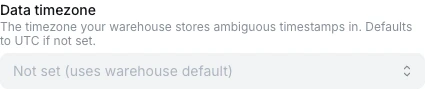
If your warehouse stores timestamps without timezone metadata (NTZ) in a non-UTC zone, set the **data timezone** so Lightdash interprets those values correctly instead of assuming UTC. Configure it under **Warehouse connection → Advanced settings → Data timezone**.
If a chart overrides the timezone via the [per-chart timezone picker](#per-chart-timezone-picker), the filter picker uses that override instead of the project query timezone.
### `LIGHTDASH_QUERY_TIMEZONE` environment variable
`LIGHTDASH_QUERY_TIMEZONE` sets a server-wide default timezone for every user and project on the instance. It controls the same behaviors as the UI setting - relative date filter boundaries unconditionally, plus display, grouping, and extracts when Beta support is enabled - and is overridden by both the per-chart timezone and the UI setting.
* **Self-hosted:** Set this environment variable directly on your instance.
* **Lightdash Cloud (Pro/Enterprise):** Contact us and we'll configure it for your instance.
### Per-dimension timezone opt-out
**Beta:** The `convert_timezone` dimension override is currently in the [Beta](/references/workspace/feature-maturity-levels) phase. Contact support to enable it, and set a project query timezone - without both, timestamps already render raw and this setting is a no-op.
By default, every `timestamp` dimension follows the project query timezone for display, grouping, and extracts. Some columns - system timestamps, audit logs, pre-converted values - should render in their raw warehouse value instead. Set [`convert_timezone: false`](/references/dimensions#convert-timezone) on the dimension to opt that single column out:
```yaml theme={null}
columns:
- name: created_at_utc
meta:
dimension:
type: timestamp
convert_timezone: false
```
```yaml theme={null}
columns:
- name: created_at_utc
config:
meta:
dimension:
type: timestamp
convert_timezone: false
```
```yaml theme={null}
dimensions:
- name: created_at_utc
type: timestamp
convert_timezone: false
```
The override propagates to every auto-generated [time interval](/references/dimensions#time-intervals) child of the dimension (`_day`, `_month`, `_day_of_week_index`, ...), so all of them render raw too.
**What it changes:** display and grouping only - table cells, exports, `DATE_TRUNC` buckets, and calendar extracts all show the raw warehouse value.
**What it doesn't change:** filters. Filters always use the project query timezone so every dimension on a row agrees on whether the row matches the filter. For example, a filter like `"between 2026-01-01 and 2026-01-31"` cuts at midnight in the project query timezone, even though the column itself renders raw.
### Data timezone
**Beta:** The data timezone setting is currently in the [Beta](/references/workspace/feature-maturity-levels) phase. Contact support to enable it for your organization. The setting only appears in warehouse advanced settings once enabled, and is not available on BigQuery or Athena.
If your warehouse stores timestamps without timezone metadata (NTZ) in a non-UTC zone, set the **data timezone** so Lightdash interprets those values correctly instead of assuming UTC. Configure it under **Warehouse connection → Advanced settings → Data timezone**.
 Once set, Lightdash issues a session command on every query so the warehouse reads ambiguous NTZ values in that zone before they're compared to filter literals or grouped.
The exact command depends on your warehouse - for example, `SET timezone TO 'America/Chicago'` on Postgres or `ALTER SESSION SET TIMEZONE = 'America/Chicago'` on Snowflake.
For an NTZ value stored as `2024-01-15 18:00:00`:
* **Without the data timezone set** - the warehouse assumes UTC, so the value is read as 6pm UTC.
* **With the data timezone set to `America/Chicago`** - the warehouse reads it as 6pm Chicago, equivalent to midnight UTC the next day.
### Scheduled delivery timezone
Project admins can set a default timezone for scheduled deliveries in **Project Settings > Syncs & Scheduled Deliveries**. Users can also override the timezone per individual delivery.
This setting only controls **when the scheduled delivery runs**. It does **not** change how queries interpret dates - relative date filters use the query timezone hierarchy described above.
## Common timezone issues and workarounds
### "Today" or "yesterday" shows unexpected data
This is the most common timezone-related issue. If you're in a timezone behind UTC, relative date filters like "today" and "last 1 completed day" will roll over before your local midnight. For example, a user in California (UTC-8) filtering for "last 1 completed day" at 3 PM Pacific on Feb 13:
* In UTC, it's already Feb 14
* Lightdash calculates "last 1 completed day" as Feb 13 (UTC)
* But the user expects "yesterday" to be Feb 12 in their local time
* The entire day window is offset by 8 hours
This isn't just a few rows being shifted - the filter boundaries are a full day off from what you'd expect.
**Workarounds:**
* **Set the project query timezone:** An admin can set the query timezone in **Settings > Project Settings** to match your team's timezone. See [Project query timezone](#project-query-timezone-ui-setting).
* **Set your user timezone:** Set a default timezone on your profile so every query you run uses it. See [User timezone](#user-timezone).
* **Use the per-chart timezone picker:** Override the timezone on a specific chart in the Explore view. See [Per-chart timezone picker](#per-chart-timezone-picker).
* **Set `LIGHTDASH_QUERY_TIMEZONE`:** Set the [`LIGHTDASH_QUERY_TIMEZONE`](#lightdash_query_timezone-environment-variable) environment variable to your preferred timezone. Available for self-hosted instances, or contact us for Lightdash Cloud (Pro/Enterprise).
* **Cast to date in dbt:** If you only need day-level granularity, cast your timestamp column to a `date` type in your dbt model. When a column uses `type: date`, there's no time component for Lightdash to apply UTC conversion to - `2026-02-12` is just `2026-02-12` regardless of timezone.
```sql theme={null}
-- In your dbt model
select
created_at::date as created_date
from your_table
```
Then in your Lightdash YAML, set `type: date` for this dimension.
The tradeoff is that you lose intraday granularity - you won't be able to group by hour or minute on this dimension.
* **Use absolute date filters:** If you know the exact dates you want, use absolute filters (e.g., "is between 2026-02-12 and 2026-02-13") instead of relative ones.
### Timestamps are stored in a specific timezone and you don't want Lightdash to change them
If your timestamps are stored in a local timezone (e.g., US Pacific Time) without timezone metadata, Lightdash still applies UTC-based filter logic by default. This can cause date filter boundaries to not line up with your data.
**Workarounds:**
* **Set the data timezone on the warehouse connection:** If Beta timezone support is enabled for your organization, set the [data timezone](#data-timezone) on the warehouse connection to match the zone your NTZ timestamps are stored in. Lightdash will issue the appropriate session command so ambiguous NTZ values get interpreted correctly.
* **Cast to date in dbt:** If you only need day-level granularity, cast to `date` type in your dbt model to remove the time component entirely (see the example above).
* **Set the project query timezone:** Set the query timezone in **Settings > Project Settings** to match the timezone your data is stored in. See [Project query timezone](#project-query-timezone-ui-setting).
* **Set `LIGHTDASH_QUERY_TIMEZONE`:** Set `LIGHTDASH_QUERY_TIMEZONE` to match the timezone your data is stored in. Available for self-hosted instances, or contact us for Lightdash Cloud (Pro/Enterprise).
### Timestamps are stored in UTC but you want to view them in a local timezone
If your data is stored in UTC and Beta timezone support is enabled for your organization, the simplest path is to set the [project query timezone](#project-query-timezone-ui-setting) to your preferred zone. Chart axes, tooltips, table cells, and exports will all render in that zone, and time interval dimensions (day, week, month, calendar extracts) will bucket on its calendar boundaries.
If you only want to convert a specific column (rather than the whole project), or if Beta timezone support is not available for you, you can use [additional dimensions](/references/dimensions#additional-dimensions) to create timezone-converted versions of a timestamp:
```yaml theme={null}
columns:
- name: created_at
description: 'Timestamp in UTC'
meta:
dimension:
label: 'Created (UTC)'
type: timestamp
additional_dimensions:
created_at_est:
type: timestamp
label: 'Created (EST)'
description: 'Created timestamp converted to Eastern Time'
sql: "convert_timezone('UTC', 'America/New_York', ${TABLE}.created_at)"
```
```yaml theme={null}
columns:
- name: created_at
description: 'Timestamp in UTC'
config:
meta:
dimension:
label: 'Created (UTC)'
type: timestamp
additional_dimensions:
created_at_est:
type: timestamp
label: 'Created (EST)'
description: 'Created timestamp converted to Eastern Time'
sql: "convert_timezone('UTC', 'America/New_York', ${TABLE}.created_at)"
```
```yaml theme={null}
dimensions:
- name: created_at
description: 'Timestamp in UTC'
label: 'Created (UTC)'
type: timestamp
- name: created_at_est
type: timestamp
label: 'Created (EST)'
description: 'Created timestamp converted to Eastern Time'
sql: "convert_timezone('UTC', 'America/New_York', ${TABLE}.created_at)"
```
With Beta timezone support enabled, the project query timezone will shift this column again on top of your `convert_timezone()` call. Set [`convert_timezone: false`](#per-dimension-timezone-opt-out) on the additional dimension to opt out. Without it, no opt-out is needed.
Filters still cut at midnight in the project query timezone so every dimension on a row agrees on matches. For filter cutoffs in the column's displayed zone, do the conversion in dbt and use `type: date` for day-level granularity.
### Scheduled deliveries run at the wrong time
If your scheduled delivery is running at an unexpected time, check both:
1. The **project-level default timezone** in Project Settings > Syncs & Scheduled Deliveries
2. Any **per-delivery timezone override** on the individual scheduled delivery
The delivery timezone only controls when the delivery runs - the query results themselves use the [query timezone hierarchy](#timezone-settings-in-lightdash) for date filter calculations.
## Summary of workarounds
| Scenario | Workaround | Limitation |
| :-------------------------------------------------------------------- | :--------------------------------------------------------------------------------- | :---------------------------------------------------- |
| "Today" shows wrong data | Set project query timezone in UI (admin) | Per-project, not per-user |
| | Set a user timezone in Profile settings | Beta; doesn't apply to embeds |
| | Use the per-chart timezone picker | Applies to one chart only |
| | Set `LIGHTDASH_QUERY_TIMEZONE` env var | Server-wide, not per-user |
| | Cast to `date` type in dbt | Loses intraday granularity |
| Timestamps stored in a local timezone without timezone metadata (NTZ) | Set the data timezone on the warehouse connection | Beta; not available on BigQuery or Athena |
| | Set the project query timezone to match | Per-project, not per-user |
| | Set `LIGHTDASH_QUERY_TIMEZONE` to match | Server-wide, not per-user |
| | Cast to `date` type in dbt | Loses intraday granularity |
| Want to display data in a different timezone | Set the project query timezone | Applies to the whole project |
| | Use additional dimensions with `convert_timezone()` plus `convert_timezone: false` | Display only - doesn't fix filter boundaries |
| Single column should keep raw warehouse value | Set `convert_timezone: false` on the dimension | Filters still cut at project query timezone midnights |
| Filter values differ across users in different browser timezones | Enable "Use project time zone in date filter inputs" | Beta; requires a project query timezone |
| Scheduled delivery runs at wrong time | Check project and per-delivery timezone settings | Only affects delivery timing, not query results |
Once set, Lightdash issues a session command on every query so the warehouse reads ambiguous NTZ values in that zone before they're compared to filter literals or grouped.
The exact command depends on your warehouse - for example, `SET timezone TO 'America/Chicago'` on Postgres or `ALTER SESSION SET TIMEZONE = 'America/Chicago'` on Snowflake.
For an NTZ value stored as `2024-01-15 18:00:00`:
* **Without the data timezone set** - the warehouse assumes UTC, so the value is read as 6pm UTC.
* **With the data timezone set to `America/Chicago`** - the warehouse reads it as 6pm Chicago, equivalent to midnight UTC the next day.
### Scheduled delivery timezone
Project admins can set a default timezone for scheduled deliveries in **Project Settings > Syncs & Scheduled Deliveries**. Users can also override the timezone per individual delivery.
This setting only controls **when the scheduled delivery runs**. It does **not** change how queries interpret dates - relative date filters use the query timezone hierarchy described above.
## Common timezone issues and workarounds
### "Today" or "yesterday" shows unexpected data
This is the most common timezone-related issue. If you're in a timezone behind UTC, relative date filters like "today" and "last 1 completed day" will roll over before your local midnight. For example, a user in California (UTC-8) filtering for "last 1 completed day" at 3 PM Pacific on Feb 13:
* In UTC, it's already Feb 14
* Lightdash calculates "last 1 completed day" as Feb 13 (UTC)
* But the user expects "yesterday" to be Feb 12 in their local time
* The entire day window is offset by 8 hours
This isn't just a few rows being shifted - the filter boundaries are a full day off from what you'd expect.
**Workarounds:**
* **Set the project query timezone:** An admin can set the query timezone in **Settings > Project Settings** to match your team's timezone. See [Project query timezone](#project-query-timezone-ui-setting).
* **Set your user timezone:** Set a default timezone on your profile so every query you run uses it. See [User timezone](#user-timezone).
* **Use the per-chart timezone picker:** Override the timezone on a specific chart in the Explore view. See [Per-chart timezone picker](#per-chart-timezone-picker).
* **Set `LIGHTDASH_QUERY_TIMEZONE`:** Set the [`LIGHTDASH_QUERY_TIMEZONE`](#lightdash_query_timezone-environment-variable) environment variable to your preferred timezone. Available for self-hosted instances, or contact us for Lightdash Cloud (Pro/Enterprise).
* **Cast to date in dbt:** If you only need day-level granularity, cast your timestamp column to a `date` type in your dbt model. When a column uses `type: date`, there's no time component for Lightdash to apply UTC conversion to - `2026-02-12` is just `2026-02-12` regardless of timezone.
```sql theme={null}
-- In your dbt model
select
created_at::date as created_date
from your_table
```
Then in your Lightdash YAML, set `type: date` for this dimension.
The tradeoff is that you lose intraday granularity - you won't be able to group by hour or minute on this dimension.
* **Use absolute date filters:** If you know the exact dates you want, use absolute filters (e.g., "is between 2026-02-12 and 2026-02-13") instead of relative ones.
### Timestamps are stored in a specific timezone and you don't want Lightdash to change them
If your timestamps are stored in a local timezone (e.g., US Pacific Time) without timezone metadata, Lightdash still applies UTC-based filter logic by default. This can cause date filter boundaries to not line up with your data.
**Workarounds:**
* **Set the data timezone on the warehouse connection:** If Beta timezone support is enabled for your organization, set the [data timezone](#data-timezone) on the warehouse connection to match the zone your NTZ timestamps are stored in. Lightdash will issue the appropriate session command so ambiguous NTZ values get interpreted correctly.
* **Cast to date in dbt:** If you only need day-level granularity, cast to `date` type in your dbt model to remove the time component entirely (see the example above).
* **Set the project query timezone:** Set the query timezone in **Settings > Project Settings** to match the timezone your data is stored in. See [Project query timezone](#project-query-timezone-ui-setting).
* **Set `LIGHTDASH_QUERY_TIMEZONE`:** Set `LIGHTDASH_QUERY_TIMEZONE` to match the timezone your data is stored in. Available for self-hosted instances, or contact us for Lightdash Cloud (Pro/Enterprise).
### Timestamps are stored in UTC but you want to view them in a local timezone
If your data is stored in UTC and Beta timezone support is enabled for your organization, the simplest path is to set the [project query timezone](#project-query-timezone-ui-setting) to your preferred zone. Chart axes, tooltips, table cells, and exports will all render in that zone, and time interval dimensions (day, week, month, calendar extracts) will bucket on its calendar boundaries.
If you only want to convert a specific column (rather than the whole project), or if Beta timezone support is not available for you, you can use [additional dimensions](/references/dimensions#additional-dimensions) to create timezone-converted versions of a timestamp:
```yaml theme={null}
columns:
- name: created_at
description: 'Timestamp in UTC'
meta:
dimension:
label: 'Created (UTC)'
type: timestamp
additional_dimensions:
created_at_est:
type: timestamp
label: 'Created (EST)'
description: 'Created timestamp converted to Eastern Time'
sql: "convert_timezone('UTC', 'America/New_York', ${TABLE}.created_at)"
```
```yaml theme={null}
columns:
- name: created_at
description: 'Timestamp in UTC'
config:
meta:
dimension:
label: 'Created (UTC)'
type: timestamp
additional_dimensions:
created_at_est:
type: timestamp
label: 'Created (EST)'
description: 'Created timestamp converted to Eastern Time'
sql: "convert_timezone('UTC', 'America/New_York', ${TABLE}.created_at)"
```
```yaml theme={null}
dimensions:
- name: created_at
description: 'Timestamp in UTC'
label: 'Created (UTC)'
type: timestamp
- name: created_at_est
type: timestamp
label: 'Created (EST)'
description: 'Created timestamp converted to Eastern Time'
sql: "convert_timezone('UTC', 'America/New_York', ${TABLE}.created_at)"
```
With Beta timezone support enabled, the project query timezone will shift this column again on top of your `convert_timezone()` call. Set [`convert_timezone: false`](#per-dimension-timezone-opt-out) on the additional dimension to opt out. Without it, no opt-out is needed.
Filters still cut at midnight in the project query timezone so every dimension on a row agrees on matches. For filter cutoffs in the column's displayed zone, do the conversion in dbt and use `type: date` for day-level granularity.
### Scheduled deliveries run at the wrong time
If your scheduled delivery is running at an unexpected time, check both:
1. The **project-level default timezone** in Project Settings > Syncs & Scheduled Deliveries
2. Any **per-delivery timezone override** on the individual scheduled delivery
The delivery timezone only controls when the delivery runs - the query results themselves use the [query timezone hierarchy](#timezone-settings-in-lightdash) for date filter calculations.
## Summary of workarounds
| Scenario | Workaround | Limitation |
| :-------------------------------------------------------------------- | :--------------------------------------------------------------------------------- | :---------------------------------------------------- |
| "Today" shows wrong data | Set project query timezone in UI (admin) | Per-project, not per-user |
| | Set a user timezone in Profile settings | Beta; doesn't apply to embeds |
| | Use the per-chart timezone picker | Applies to one chart only |
| | Set `LIGHTDASH_QUERY_TIMEZONE` env var | Server-wide, not per-user |
| | Cast to `date` type in dbt | Loses intraday granularity |
| Timestamps stored in a local timezone without timezone metadata (NTZ) | Set the data timezone on the warehouse connection | Beta; not available on BigQuery or Athena |
| | Set the project query timezone to match | Per-project, not per-user |
| | Set `LIGHTDASH_QUERY_TIMEZONE` to match | Server-wide, not per-user |
| | Cast to `date` type in dbt | Loses intraday granularity |
| Want to display data in a different timezone | Set the project query timezone | Applies to the whole project |
| | Use additional dimensions with `convert_timezone()` plus `convert_timezone: false` | Display only - doesn't fix filter boundaries |
| Single column should keep raw warehouse value | Set `convert_timezone: false` on the dimension | Filters still cut at project query timezone midnights |
| Filter values differ across users in different browser timezones | Enable "Use project time zone in date filter inputs" | Beta; requires a project query timezone |
| Scheduled delivery runs at wrong time | Check project and per-delivery timezone settings | Only affects delivery timing, not query results |